
Domain Filtering & Threat Blocklists
DNS Worker features an enterprise-grade protective domain filtering engine capable of evaluating hundreds of thousands of blocking rules with sub-millisecond latency. It shields your network and client devices against intrusive advertisements, telemetry trackers, malware, phishing sites, cryptojacking, and malicious command-and-control (C2) domains.
1. Threat Defense & Protection Capabilities
Section titled “1. Threat Defense & Protection Capabilities”DNS Worker intercepts cyber threats at the foundational DNS layer—preventing connections before TCP handshakes or TLS negotiations even occur.
Protected Threat Categories
Section titled “Protected Threat Categories”- Malicious Domains & Malware: Blocks command-and-control (C2) servers, trojan distribution endpoints, botnets, and ransomware callback domains.
- Phishing & Fraud: Neutralizes fraudulent financial portals, credential harvesting pages, and impersonation domains.
- Intrusive Advertising & Trackers: Silently terminates banner ads, popups, video ad servers, and cross-site telemetry beacons across all mobile apps and websites.
- Operating System & Device Telemetry: Stops aggressive diagnostic data collection from Windows, macOS, Android, smart TVs, and IoT appliances.
- Cryptominers: Blocks in-browser and background cryptocurrency mining scripts.
2. Web UI Filter Rule Management
Section titled “2. Web UI Filter Rule Management”Subscribing to External Blocklists
Section titled “Subscribing to External Blocklists”Navigate to Filters (规则订阅) in the Web Dashboard to inspect and manage your blocklist subscriptions.
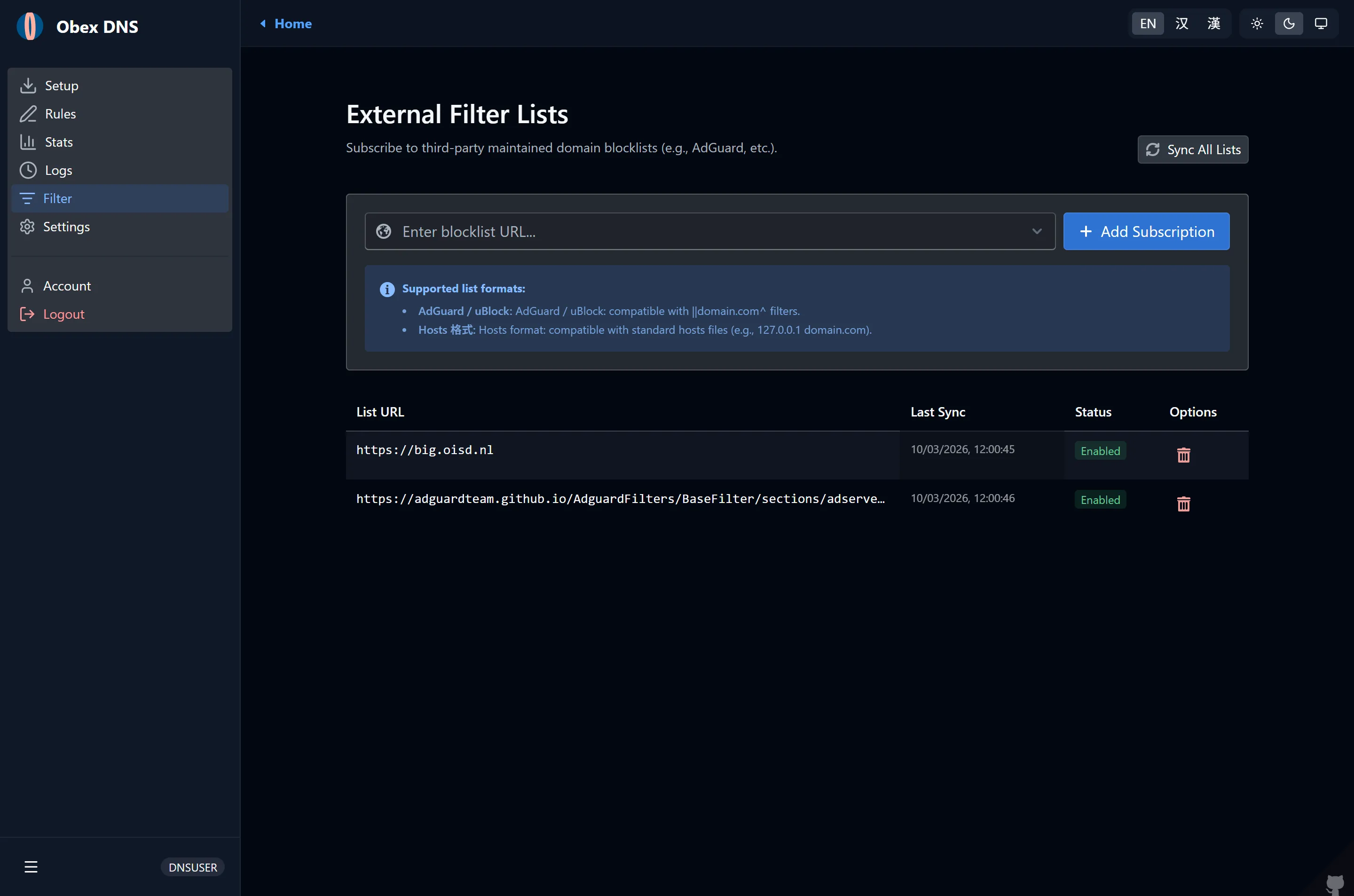
- Under External Blocklists, click Add Subscription.
- Enter the subscription URL (supports standard Adblock Plus, Hosts, or domain list formats).
- Popular pre-tested lists include:
- OISD Big:
https://big.oisd.nl(comprehensive baseline ad & tracking protection) - AdGuard Base:
https://adguardteam.github.io/HostlistsRegistry/assets/filter_1.txt - HaGeZi Multi PRO++:
https://raw.githubusercontent.com/hagezi/dns-blocklists/main/adblock/pro.plus.txt(aggressive threat defense) - StevenBlack Unified:
https://raw.githubusercontent.com/StevenBlack/hosts/master/hosts
- OISD Big:
- Click Save & Sync. DNS Worker parses the rules into optimized memory buffers and updates subscription metadata:
- Domain Count: Displays total parsed unique domain rules (e.g. 100,000+).
- Status Badges: Shows
Normal(synchronized),Outdated(sync pending), orMissing(download failed). - Automated Sync: Background cron jobs automatically refresh subscriptions on a scheduled cadence.
Custom Allowlist, Blocklist & Rewrites
Section titled “Custom Allowlist, Blocklist & Rewrites”Navigate to Rules (自定义规则) to configure instant manual overrides on a per-profile basis:
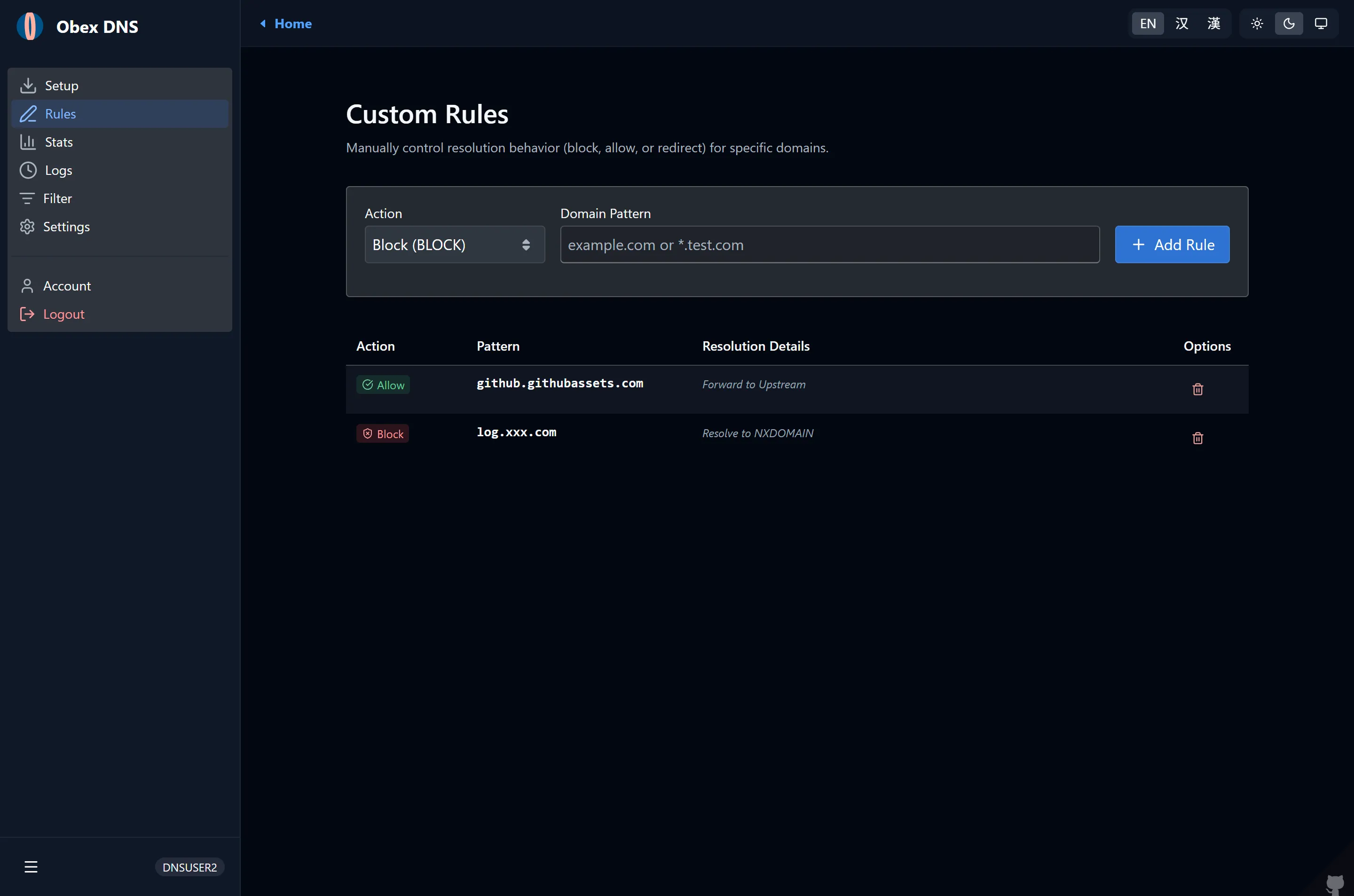
- Allowlist (白名单): Domains that bypass all blocking rules (e.g., corporate subdomains or false positives).
- Blocklist (黑名单): Explicitly banned domains that take immediate precedence over external lists.
- DNS Rewrites (重写 / 重定向): Maps custom domains to specific IP addresses or local services (e.g., intranet services or SafeSearch enforcement like
forcesafesearch.google.com). - Supported Syntax:
- Plain domains:
ad.example.com - Subdomain wildcards:
*.tracking.company.comor||adservice.google.com^ - Regular expressions:
^analytics-[0-9]+\..*$
- Plain domains:
Block Action Modes
Section titled “Block Action Modes”In your profile settings, select how blocked queries are handled:
| Block Mode | Response Behavior | Advantages |
|---|---|---|
| Zero IP (0.0.0.0 / ::) | Returns 0.0.0.0 for IPv4 and :: for IPv6 |
Recommended. Fastest client termination, prevents timeout retries. |
| NXDOMAIN | Returns RCODE 3 (Domain Not Found) | Standards-compliant, signals client that the domain does not exist. |
| Refused | Returns RCODE 5 (Query Refused) | Distinguishes blocked requests from non-existent domains. |
3. Real-Time Threat Audit & Query Logs
Section titled “3. Real-Time Threat Audit & Query Logs”DNS Worker provides instant visibility into intercepted threats and permitted resolutions through the Logs view:
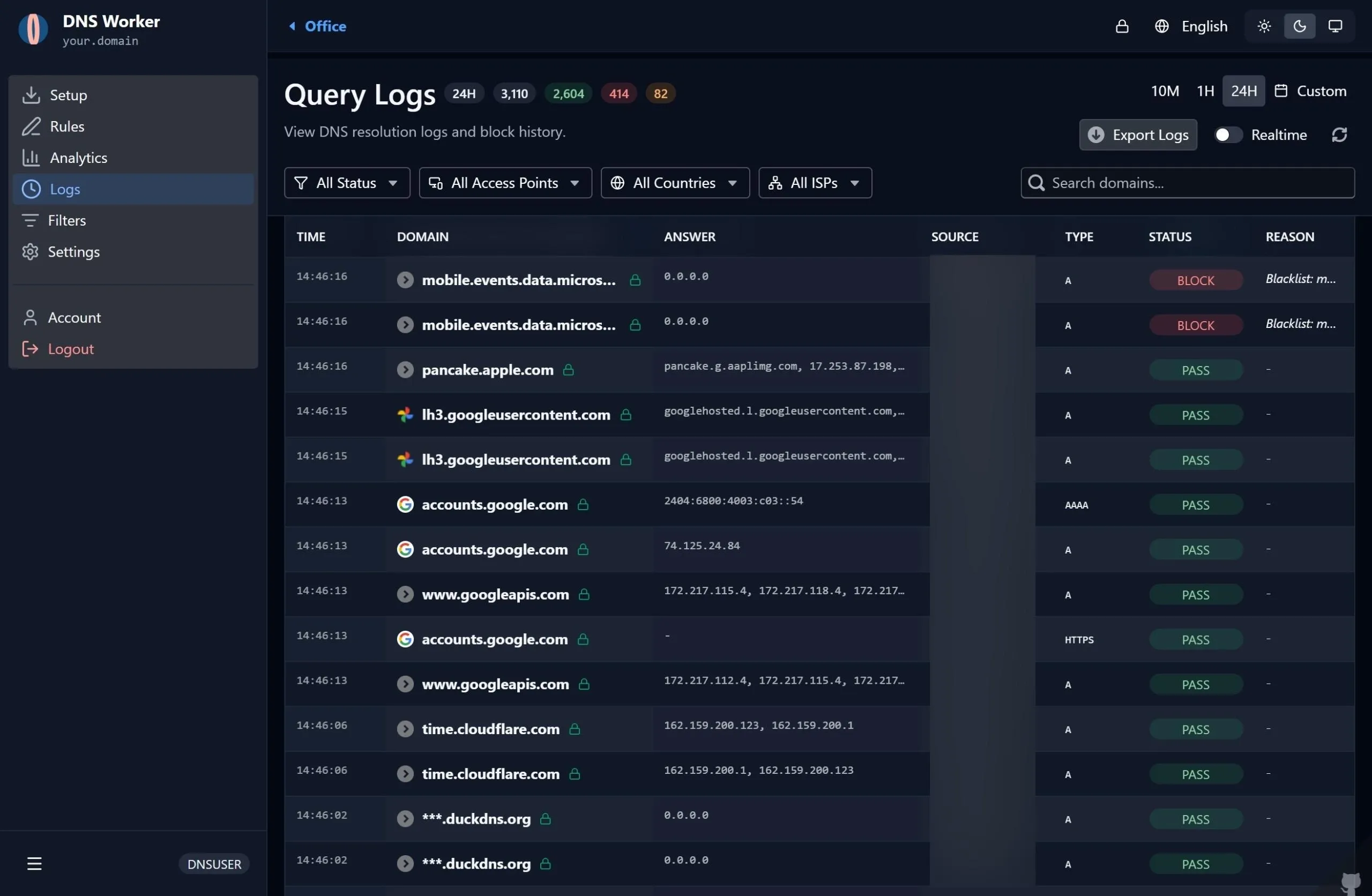
- Instant Visual Status:
BLOCK(Red): Queries intercepted by external blocklists or custom blacklist rules. Displays the synthetic block answer (0.0.0.0).PASS(Green): Legitimate queries forwarded to upstream resolvers and successfully answered.REWRITE(Blue): Queries mapped to custom redirect targets.
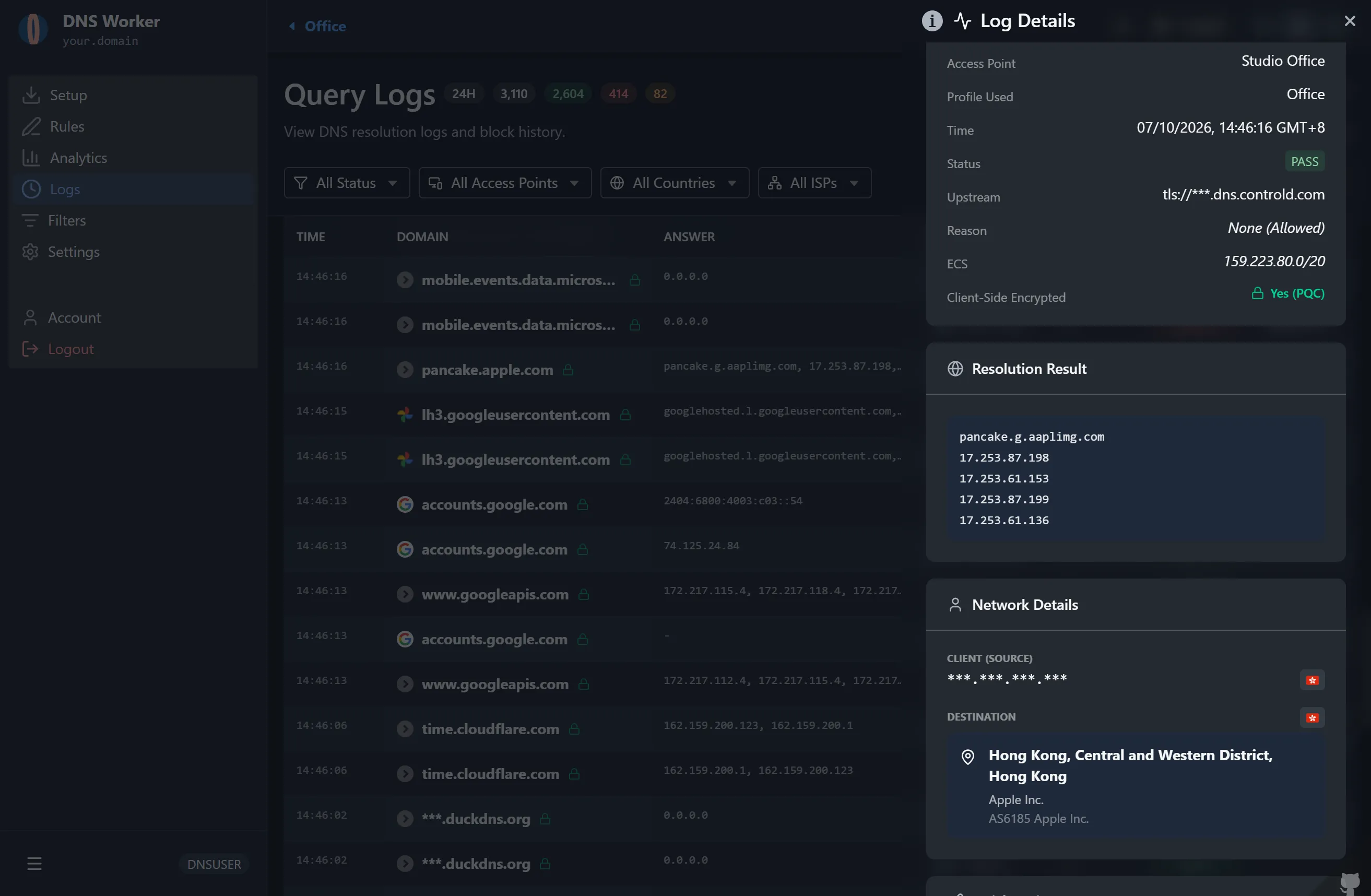
- Threat Audit Drawer: Clicking on any query entry slides out the inspection drawer, detailing the exact rule match, client IP, geographic origin, upstream latency, and post-quantum encryption status.
4. Match Engine Architecture: Bloom Filters & Trie
Section titled “4. Match Engine Architecture: Bloom Filters & Trie”To maintain high throughput on lightweight environments (such as VPS instances with 512MB RAM or Cloudflare Workers edge nodes with 128MB memory caps), DNS Worker uses a Dual-Layer Bloom Filter architecture:
Incoming Query (e.g. adserver.tracker.com) │ ▼┌─────────────────────────────────┐│ Bloom Filter Fast Check ││ (Compact Bitset in RAM / KV) │└─────────────────────────────────┘ │ │ (Negative) (Positive) │ ▼ │ ┌─────────────────────────────────┐ │ │ Exact Trie Verification Check │ │ │ (Prevents false positive blocks)│ │ └─────────────────────────────────┘ │ │ │ ▼ ▼ ▼ [ ALLOWED ] [ BLOCKED ] [ ALLOWED ]- Bloom Filter Layer: Queries are hashed across a compact bitset. Over 99% of non-blocked domains are instantly validated in $O(1)$ time without database I/O.
- Exact Verification Layer: If the Bloom filter detects a possible match, the query is checked against an exact memory Trie to eliminate false positives.
5. Filtering Environment Variables Reference
Section titled “5. Filtering Environment Variables Reference”Configure these variables in .env (Serverfull) or wrangler.toml (Cloudflare Workers).
PRESET_EXTERNAL_FILTERS
Section titled “PRESET_EXTERNAL_FILTERS”- Supported in: Serverless & Serverfull
- Format in
wrangler.toml: Multi-line TOML string containing a JSON array of{ label, url }objects. - Format in
.env.serverfull: JSON string. - Default: Curated default subscriptions including OISD Big (
https://big.oisd.nl), OISD NSFW, AdGuard Base, and StevenBlack hosts.
BLOOM_FALSE_POSITIVE_RATE
Section titled “BLOOM_FALSE_POSITIVE_RATE”- Supported in: Serverless & Serverfull
- Default (
wrangler.toml):0.0001(1 in 10,000) - Default (
.env.serverfull):0.0001 - Description: Configures bitset size calculation for Bloom filters. The lower threshold (0.0001) minimizes false positives and eliminates CPU spikes during rule evaluation.
MAX_SYNC_DOMAINS & MAX_LIST_DOMAINS
Section titled “MAX_SYNC_DOMAINS & MAX_LIST_DOMAINS”- Supported in: Serverless & Serverfull
- Defaults:
MAX_SYNC_DOMAINS=1000000(1 million total) &MAX_LIST_DOMAINS=500000(500k per list). - Description: Safety boundaries to prevent unbounded memory allocation during external filter fetching.
BLOOM_MEM_TTL & SYNC_TIMEOUT_MS
Section titled “BLOOM_MEM_TTL & SYNC_TIMEOUT_MS”- Defaults:
BLOOM_MEM_TTL=600000(10 minutes in-memory cache) &SYNC_TIMEOUT_MS=30000(30s download timeout). - Description: Cache retention time for compiled bloom filters in memory and maximum network timeout when downloading upstream blocklists.
CONFIG_MEM_TTL
Section titled “CONFIG_MEM_TTL”- Supported in: Serverless & Serverfull
- Default:
300000(5 minutes) - Description: How long each Worker isolate keeps a profile’s settings and rules in memory. The Cache-Tag purge (
CF_ZONE_ID/CF_PURGE_TOKEN) clears the cached copy in every data center, but not the in-memory copy held by other isolates, so this value bounds how long a settings change can take to apply everywhere. Lowering it (e.g.60000) is cheap: a re-read is normally served from the Cache API rather than the database.
SUBSTITUTE_DOMAIN
Section titled “SUBSTITUTE_DOMAIN”- Supported in: Serverless & Serverfull
- Default:
www.okx.com - Description: Probing domain used for latency benchmarking and fail-open detection against upstreams.
BLOCK_MODE
Section titled “BLOCK_MODE”- Supported in: Serverless & Serverfull
- Default:
zero_ip(0.0.0.0/::) - Options:
zero_ip,nxdomain,refused - Description: Global fallback blocking behavior when not overridden in per-profile settings.